 Miro Radenovic
 How AI Agents Are Quietly Eliminating Your IT Support Backlog
Discover how AI agents are transforming L1 IT support — autonomously resolving tickets, building knowledge bases, and freeing your team for complex work. Real metrics, real results.
Every Monday morning, the IT support queue looks exactly the same. Password reset. VPN not connecting. Shared mailbox access. Software license request. Then a password reset again — from a different person, with the same fix.
Your L2 engineers — the ones who can debug complex integrations, architect Microsoft 365 environments, and actually drive digital transformation — are clearing the same twenty ticket types they cleared last week. It is not a people problem. It is a process problem. And it is now a solvable one.
The L1 Support Problem, by the Numbers
In most enterprise environments, 40–60% of IT support tickets are repetitive L1 requests. That is not an estimate pulled from industry reports — it is consistent with what you see when you audit real service desk queues. Password resets, MFA enrollment issues, account unlocks, VPN configuration guides, basic software provisioning: these requests follow predictable patterns and have documented resolutions.
The financial cost is real. An average L1 ticket costs €8–€20 to resolve when you factor in technician time, context switching, and overhead. At 500 tickets per month — a modest volume for any mid-sized company — you are spending between €4,000 and €10,000 monthly on work that could be systematised.
But the cost that does not appear on any invoice is the focus tax. Every L1 ticket that lands with a skilled technician is a context switch that interrupts deeper work. It increases mean time to resolution (MTTR) for complex issues. It creates inconsistency: the answer you get depends on who picks up the ticket, not what the correct resolution is. And it quietly accelerates burnout.
What an AI Support Agent Actually Does
This is where the conversation often goes wrong. When most IT leaders hear “AI for the service desk,” they picture a chatbot — a knowledge base with a search bar and a friendly interface. That is not what we are describing.
An AI support agent is a system that classifies, reasons, retrieves, responds, acts, and learns — continuously, without a queue.
Ticket Triage and Classification
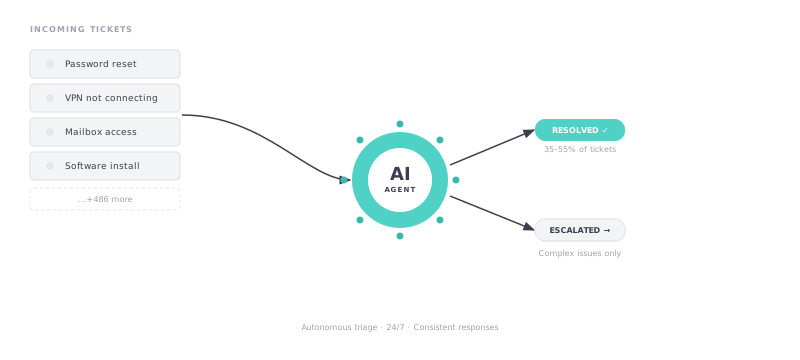
When a new ticket arrives — by email, Teams message, or web form — the agent classifies it in real time. Type, urgency, affected department, likely root cause. It determines immediately whether this ticket falls within its autonomous resolution scope or needs to be escalated, and to whom.
This alone eliminates the triage bottleneck. Instead of a technician spending five minutes reading and routing each ticket, the agent does it in seconds — and does it consistently at 3 AM on a Sunday as well as at 9 AM on a Tuesday.
Autonomous Resolution
For tickets within scope, the agent retrieves the relevant resolution from the knowledge base, constructs a contextual response, and sends it to the requester. It does not paste a generic article — it adapts the guidance to the user’s specific situation, their role, their environment, and the way the question was asked.
For a subset of request types — password resets, account unlocks, Microsoft 365 licence assignments, shared mailbox access provisioning — the agent can act directly. Integrated with Azure Active Directory and your ITSM platform, it completes the action, confirms it to the user, and logs the resolution. The technician never sees it.
Knowledge Base Enrichment
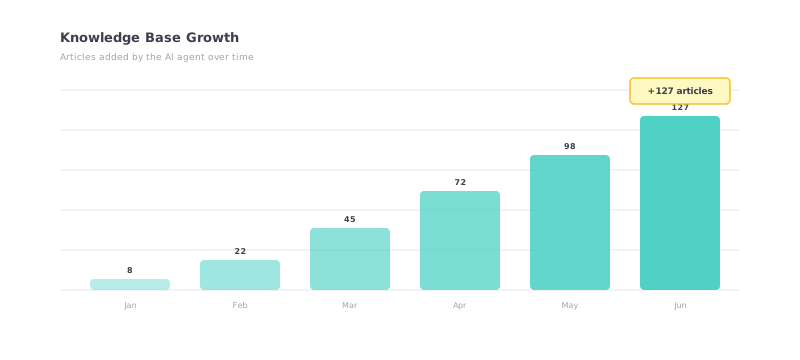
Not every ticket has an existing article. When the agent encounters a novel issue — one it resolves through escalation and engineer interaction — it automatically drafts a knowledge base article from the resolution. The article is flagged for human review before publication, but the work of capturing institutional knowledge happens continuously, not when someone remembers to document it.
Over six months, a well-deployed agent typically adds 80–150 validated KB articles. That is the difference between a knowledge base that grows stale and one that compounds in value over time.
Proactive Knowledge Maintenance
Knowledge bases degrade silently. An article written eighteen months ago may reference a workflow that has since changed. A resolution that worked for Windows 10 may fail on Windows 11. The agent monitors for outdated, uncited, or internally contradictory articles and sends alerts to the service desk team when it detects issues.
This is the capability that makes the system self-sustaining. The agent is not just consuming the knowledge base — it is actively maintaining it.
The Metrics That Matter
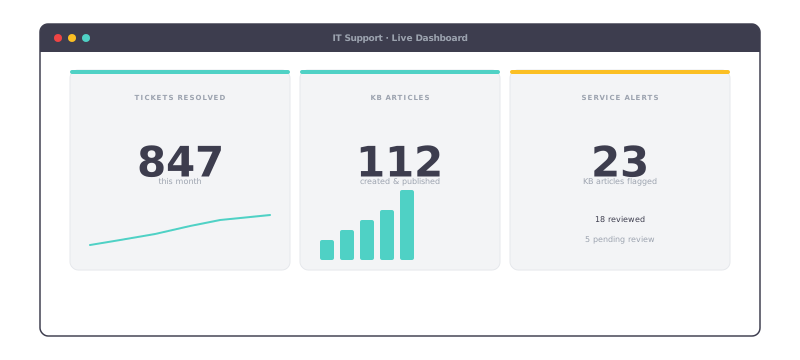
Three metrics define the value of an IT support agent. They are agreed upfront, visible in a real-time governance dashboard, and used as the basis for billing.
Tickets resolved autonomously is the primary value driver. Each ticket the agent resolves without human involvement is a ticket that did not land in a technician’s queue, did not incur resolution time, and did not interrupt deeper work. Typical autonomous resolution rate for L1 scope: 35–55% of total volume within 60 days of deployment.
KB articles created is the compounding value metric. Unlike tickets resolved — which deliver value once — a KB article delivers value every time a similar issue recurs. A library of 200 well-maintained articles is worth more than a library of 50 articles that has not been touched in a year.
Service desk alerts sent is the proactive maintenance metric. It measures how many times the agent flagged an outdated or conflicting KB entry before it caused a wrong resolution. This is the metric that is easy to overlook but critical for long-term quality.
What This Means for Your Team
This is not about replacing IT engineers. It is about stopping skilled people from doing work that does not require skill.
When the agent absorbs 40–50% of L1 ticket volume, your L2 and L3 engineers stop being interrupted by access requests and password issues. They have unbroken time to work on the problems that actually require their expertise. MTTR on complex issues drops — not because the engineers work faster, but because they work with fewer interruptions.
The reduction in cognitive load matters too. One of the underappreciated drivers of service desk attrition is the relentless low-stakes noise of L1 tickets. Eliminating that noise does not just improve metrics — it makes the job better for the people doing it.
Organisations that deploy an L1 support agent typically see 35–55% autonomous resolution of L1 volume within 60 days. That number grows as the knowledge base expands and the agent learns the patterns specific to your environment.
A Deployment Model That Eliminates Upfront Risk
Related: If your IT team is also dealing with employees using unsanctioned AI tools, read Shadow AI: The Silent Risk in Your Organization — governance and IT automation go hand in hand.
Traditional enterprise software deployments follow a predictable pattern: scoping, licensing, professional services fees, and a six-figure invoice before you have seen a single result. A full-featured ITSM automation implementation can cost €30,000–€50,000 upfront — and that is before ongoing maintenance.
The pay-per-action model changes the calculus entirely. You commit to a minimum monthly action volume, which covers the cost of building and maintaining the agent. You pay for actual value delivered: a fixed price per ticket autonomously resolved, per KB article created, per alert sent. If the agent does not perform, you do not pay for performance.
This aligns incentives in a way that traditional software licensing does not. The service provider succeeds only when the agent succeeds. The deployment is designed to hit performance targets, not to clear a delivery milestone.
For a mid-sized IT team handling 400–600 L1 tickets per month, the monthly cost of a deployed agent typically lands well below the labour cost of the tickets it replaces. The ROI is not a projection — it is a calculation you can run against your own numbers before you commit to anything.
See it in action.
Get your first agent scoped — at no upfront cost.